Inside a Custom CRM: The Schema, the Pipeline, the Sync and the Migration
Five tables, one honest pipeline, and the save-first pattern that never loses a lead. With Postgres and Node.js.
The part nobody shows you
Every "what is a custom CRM" article stops at the benefits. Fits your process, no seat fees, you own it.
All true. None of it tells a developer what is actually inside one.
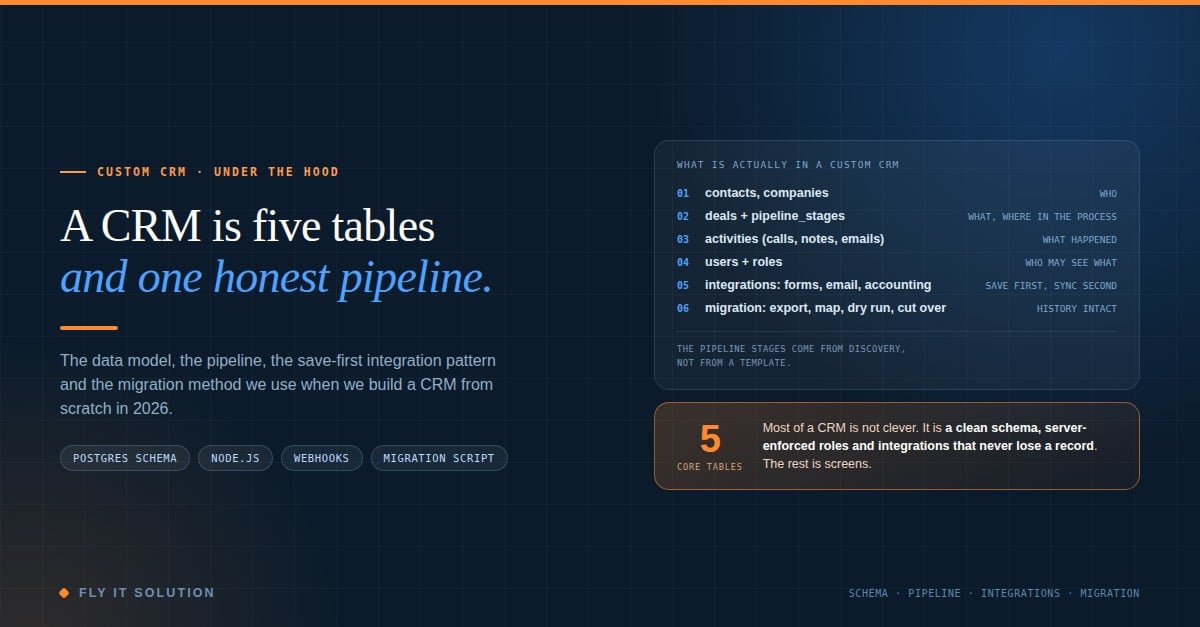
So here is the inside. This is the shape we use when we build a CRM from scratch for a business: the data model, the pipeline, the integration pattern and the migration method. It is less clever than people expect, and that is the point.
Five tables do most of the work
A CRM is a system of record for who you deal with, what you are trying to sell them, and what has happened so far. That is three ideas, and they map to a small set of tables.
-- who
create table companies (
  id         uuid primary key default gen_random_uuid(),
  name       text not null,
  created_at timestamptz not null default now()
);

create table contacts (
  id         uuid primary key default gen_random_uuid(),
  company_id uuid references companies (id) on delete set null,
  full_name  text not null,
  email      text,
  phone      text,
  created_at timestamptz not null default now()
);

-- where in the process
create table pipeline_stages (
  id       smallserial primary key,
  name     text not null,          -- "Site survey", "Quote sent", "Deposit paid"
  position int  not null,
  is_won   boolean not null default false,
  is_lost  boolean not null default false
);

-- what you are trying to sell
create table deals (
  id               uuid primary key default gen_random_uuid(),
  contact_id       uuid not null references contacts (id),
  stage_id         smallint not null references pipeline_stages (id),
  owner_id         uuid not null references users (id),
  value_cents      bigint,
  stage_changed_at timestamptz not null default now(),
  created_at       timestamptz not null default now()
);

-- what happened
create table activities (
  id          uuid primary key default gen_random_uuid(),
  deal_id     uuid references deals (id) on delete cascade,
  contact_id  uuid references contacts (id) on delete cascade,
  user_id     uuid not null references users (id),
  kind        text not null,       -- call, note, email, meeting
  body        text,
  occurred_at timestamptz not null default now()
);
A few things worth noticing.
Pipeline stages are a table, not an enum. The business will rename them, reorder them and add one in month three. A table makes that a row update, not a deployment.
stage_changed_at is on the deal. Without it you cannot answer the first question every sales manager asks: how long has this been sitting in Quote sent?
Activities belong to a deal or a contact. A call before there is a deal still needs a home.
Everything else in a CRM, from custom fields to tags to documents, hangs off these five tables. Start here, and the rest is screens.
The pipeline comes from discovery, not from a template
Off-the-shelf CRMs ship with Lead, Qualified, Proposal, Closed. Most businesses do not sell like that.
A moving company we built for runs jobs through survey, quote, deposit, crew assigned, moved, invoiced. A training company runs enquiry, call booked, proposal, signed, delivered. If the stages do not match the real process, the real process moves to a spreadsheet and the CRM becomes where things get pasted later.
So the first week or two of a build is not code. It is sitting with the people who use the current system and writing down how a deal actually moves, including the workarounds. The pipeline_stages rows come out of that conversation. If you want the business-side view of that process, I wrote up how a custom CRM build works step by step on our blog.
Roles are enforced on the server, or they are not enforced
Every CRM needs at least three kinds of user: admins, people who work deals, and people who only look.
The mistake is hiding menu items and calling that access control. Enforce it where the data is. In Postgres that can be row-level security; in a Node.js API it is a check on every handler. Either way, a rep must not be able to see another rep's deals by editing a URL, and a read-only manager must not be able to change a stage by calling the endpoint directly.
// Express middleware: a user may read a deal if they own it or are a manager
async function canReadDeal(req, res, next) {
  const deal = await db.deals.findById(req.params.id);
  if (!deal) return res.sendStatus(404);

  const isOwner = deal.owner_id === req.user.id;
  const isManager = ['admin', 'manager'].includes(req.user.role);
  if (!isOwner && !isManager) return res.sendStatus(403);

  req.deal = deal;
  next();
}
Simple, boring, and the thing that lets a business say the leads belong to the company rather than to whoever answered the phone.
Integrations: save first, sync second
A custom CRM is only useful if leads arrive in it without a human retyping them. Website forms, email, accounting, ERP.
The pattern that never loses a record is the same every time. Write the lead to your own database first. Then, from the server, push it to the other system, match on email or phone to avoid duplicates, and retry if the other side is down.
// 1. save the lead locally (this is the only step that must succeed)
const lead = await db.leads.insert({ ...form, synced: false });

// 2. sync in the background; failures are retried, never shown to the visitor
queue.add('sync-lead', { leadId: lead.id });
The visitor sees a thank-you page in milliseconds. The CRM, the accounting tool or the marketing platform catches up a moment later, and if it is unavailable for an hour, nothing is lost. We use exactly this shape to connect website forms to a CRM without losing leads, and the write-up has the field mapping if you want it.
Migration: export, map, dry run, cut over
The step clients fear most has the clearest method.
Export everything from the old system: contacts, companies, deals, notes, tasks, attachments, and the history of stage changes if the old tool exposes it. Clean it, which means dedupe on email and phone, drop fields nobody ever filled, and normalize phone numbers once.
Then write the mapping as code, not as a spreadsheet of intentions:
const mapDeal = (old) => ({
  contact_id:  contactIdByOldId.get(old.ContactId),
  stage_id:    stageIdByName.get(old.Stage) ?? stageIdByName.get('Unsorted'),
  owner_id:    userIdByEmail.get(old.OwnerEmail) ?? defaultOwnerId,
  value_cents: Math.round(Number(old.Amount || 0) * 100),
  created_at:  new Date(old.CreatedDate),
});
Run it against a copy of the database. Compare counts: same number of contacts, same number of open deals, same total pipeline value. Spot-check twenty records by hand. Only then run it for real, usually over a weekend, so the team opens the new CRM on Monday with its history intact.
The Unsorted fallback stage matters. Old systems always have deals in states that no longer exist. Put them somewhere visible rather than silently dropping them.
Reports are queries, not a module
In a per-seat CRM, reporting is often a paid tier. In a custom one it is a query over tables you designed.
-- deals stuck in a stage longer than 14 days, by owner
select u.full_name, s.name as stage, count(*) as stuck
from deals d
join pipeline_stages s on s.id = d.stage_id
join users u on u.id = d.owner_id
where d.stage_changed_at < now() - interval '14 days'
  and not s.is_won and not s.is_lost
group by u.full_name, s.name
order by stuck desc;
That one query answers a question most businesses currently answer by exporting to Excel on a Friday.
When you should not build one
Honest version: if the business is small, the sales process is standard and the CRM bill is a rounding error, a ready-made tool is the right call. The code above is not hard, but somebody has to own it after launch, and a custom CRM with no owner rots faster than a subscription.
It earns its cost when the process is part of how the business wins, when license fees grow with every hire, or when the integrations it needs do not exist off the shelf.
Where this comes from
This is the shape behind our custom CRM software development work: Node.js, React and PostgreSQL, built around the client's process, with the code and the data owned by the client. The moving-company example above replaced a per-user system that was costing them around $15,000 a year.
If you are building one yourself, start with the five tables and the honest pipeline. If you would rather talk it through, I am easy to find.
About the author
- Ankush Tarika leads custom software delivery at Fly IT Solution, a development company in Minneapolis, MN and Mohali, India. He writes about MVPs, SaaS architecture and the difference between a product and an experiment.
Comments
Join the discussionThe migration section was the useful bit for me. Keeping the source of each field next to the value saves a lot of arguing later about which system was right. Did you keep the old IDs as a column after the move?